

Agent Tool Policies
What it does
Section titled “What it does”Agent Tool Policies lets you author allow/deny rules for the tools an AI agent may invoke — for example, restricting shell access, network access, or capping the number of tool calls per run. Each policy is a named object with three settings: Allow Shell, Allow Network, and Max Tool Calls.
Configure in the UI
Section titled “Configure in the UI”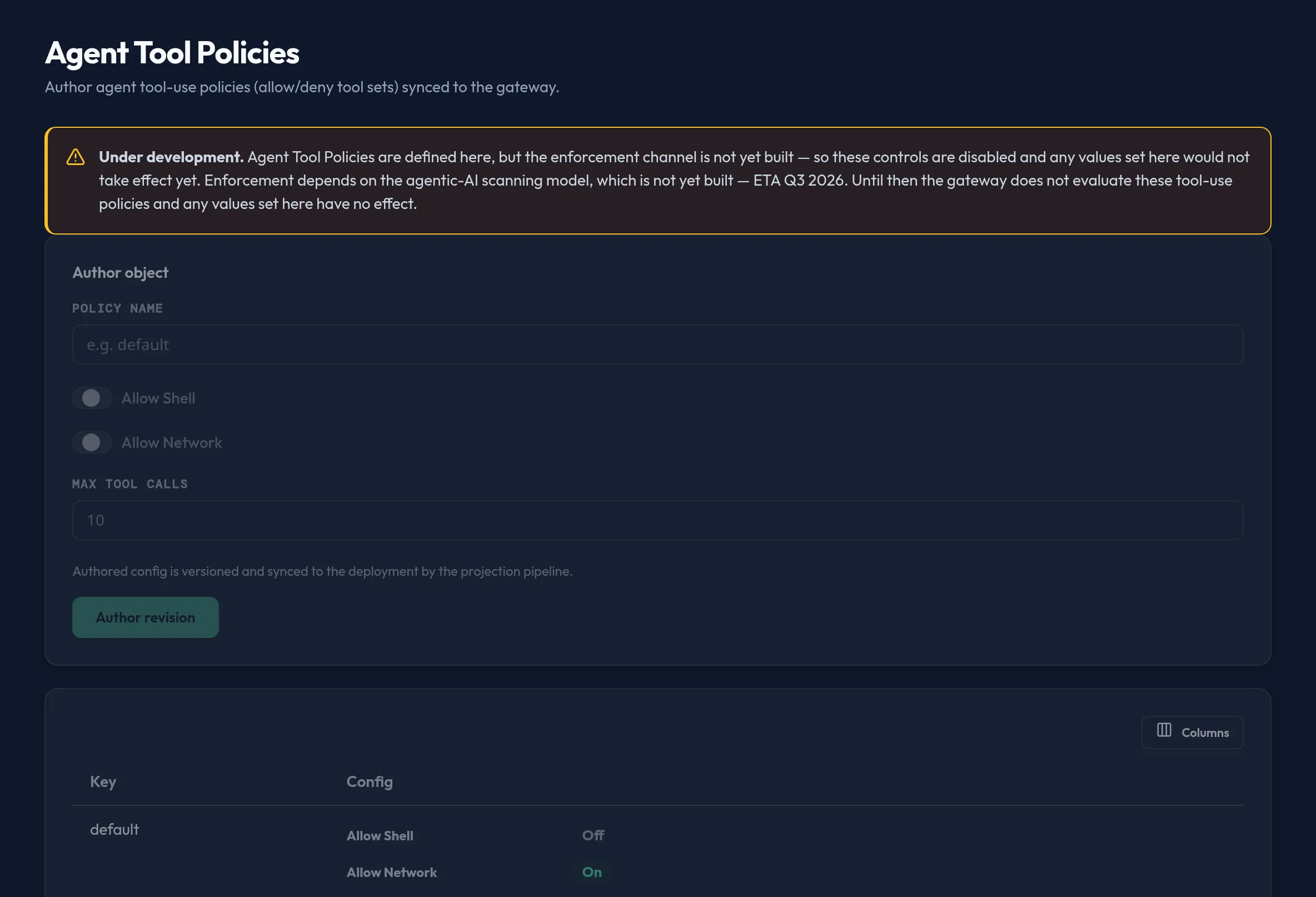
-
Open Models & Routing → Agent Tool Policies. The whole authoring area is dimmed and every field is disabled — this is intentional, not a bug.
-
Once the dependency lands, the form will let you set a Policy name, toggle Allow Shell and Allow Network, and set Max Tool Calls, then commit with Author revision.
-
A read-only table below the form lists every policy you have authored so far, by key, even while the page is disabled — so the values are not lost, only inert.
API equivalent
Section titled “API equivalent”The list and author calls exist today and store the policy object, but — per the disclosure above — the gateway does not yet read or enforce it.
curl -X POST "https://admin.arbitex.ai/api/v1/admin/models-routing/agent-tool-policies/list" \ -H "Authorization: Bearer $ADMIN_TOKEN" \ -H "Content-Type: application/json" \ -d '{"du_id": null}'curl -X POST "https://admin.arbitex.ai/api/v1/admin/models-routing/agent-tool-policies/set" \ -H "Authorization: Bearer $ADMIN_TOKEN" \ -H "Content-Type: application/json" \ -d '{"du_id": null, "objects": [{"object_key": "default", "allow_shell": false, "allow_network": true, "max_tool_calls": 10}]}'set replaces the entire authored set for the segment (all existing policies
plus your new or edited one) as a single versioned revision — there is no
partial-update or delete verb.
Plan & availability
Section titled “Plan & availability”Agent Tool Policies is visible in the console on every plan. Because enforcement is not yet built, no plan tier currently gets functional tool-use restriction from this surface — that will change once the agentic-AI scanning model ships.
Deployment notes
Section titled “Deployment notes”Authored policies are synced to a deployment unit by the same projection pipeline as every other Models & Routing surface. On a Hybrid Outpost, that means the (currently inert) policy object is versioned and pushed to the outpost like any other config; there is no different behavior for air-gapped deployments today because nothing downstream reads the value yet.
Related
Section titled “Related”- MCP Servers — per-tool allow/deny policy that is enforced today for registered MCP servers.
- Model Risk Management — governance that is enforced at dispatch (fail-closed) for models.