

Managing users
What it does
Section titled “What it does”The Users & Groups surface is your organization’s roster and group directory. Its Team roster section is where you review every account, change a user’s role, activate or deactivate access, and start account recovery when someone is locked out.
Configure in the UI
Section titled “Configure in the UI”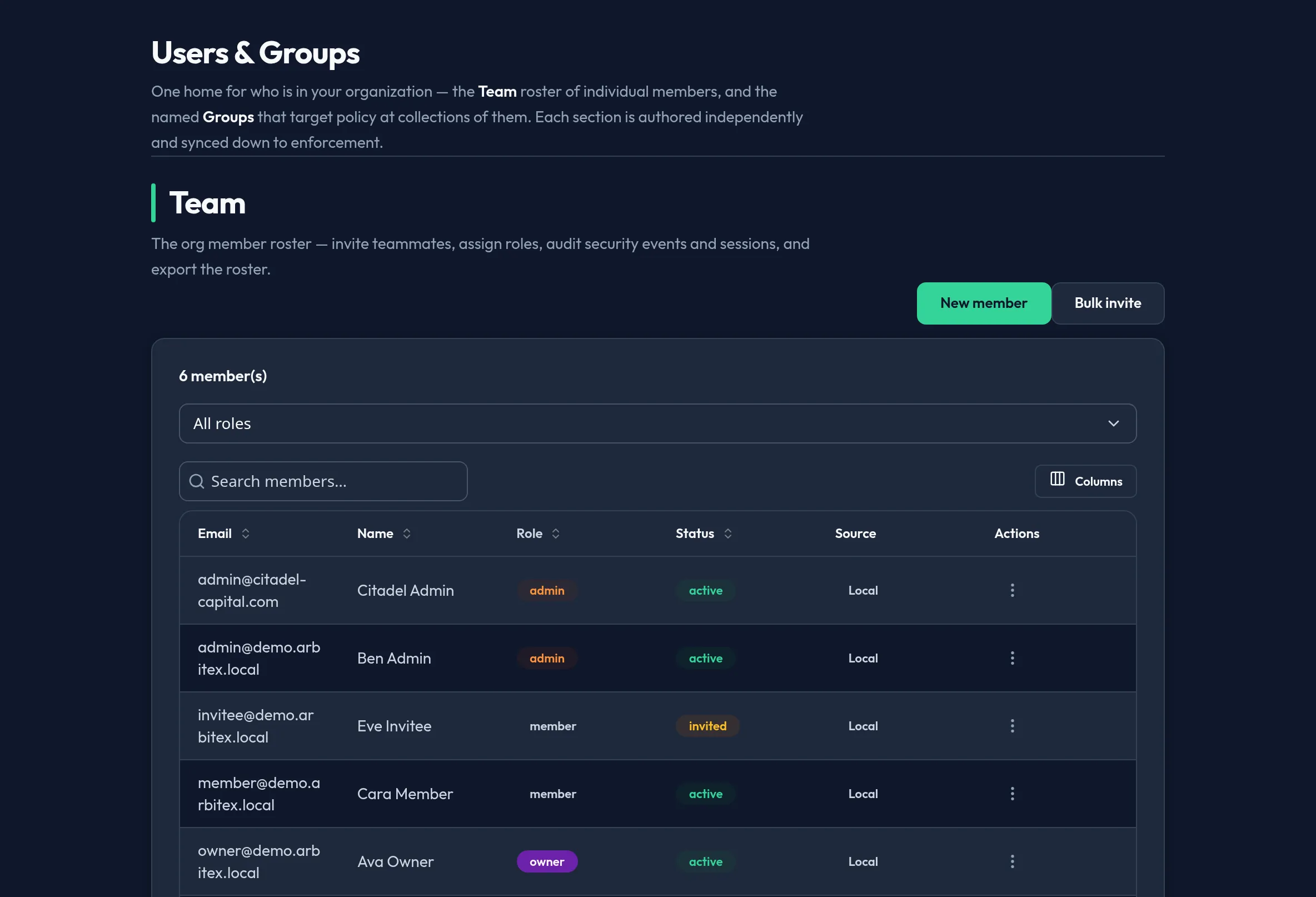
-
Open Users & Access → Users & Groups in the admin console and use its Team roster section. The roster loads with name, email, role, and status for every account.
-
Use the search box to filter by name or email. The table paginates on the client, so large orgs stay responsive.
-
To change someone’s role, open the row’s action menu and pick a new role (for example, Member → Admin). The change takes effect immediately.
-
To suspend access, toggle the account’s status to inactive. An inactive user cannot sign in or call the API, but their history and group memberships are preserved.
-
If a user is locked out, choose Send recovery from the row menu to start the self-service account recovery flow. Arbitex emails them a recovery link.
API equivalent
Section titled “API equivalent”The Users panel is backed by the admin users API (control plane). All calls
require the admin role.
List the roster (offset-paginated; the backend caps limit at 100):
curl -X POST "https://admin.arbitex.ai/api/v1/admin/users?limit=100&offset=0" \ -H "Authorization: Bearer $ADMIN_TOKEN"# → { "items": [ { "id": "...", "email": "...", "role": "member", "is_active": true } ], "total": 42 }Change a user’s role:
curl -X POST "https://admin.arbitex.ai/api/v1/admin/users/$USER_ID/role" \ -H "Authorization: Bearer $ADMIN_TOKEN" \ -H "Content-Type: application/json" \ -d '{"role": "admin"}'Plan & availability
Section titled “Plan & availability”User management is available on every plan. The maximum number of active users is governed by your plan’s seat count; when you reach it, inviting or activating a user surfaces an upgrade prompt in the console.
Deployment notes
Section titled “Deployment notes”On a Hybrid Outpost, the roster is served from the org’s control-plane database. In an air-gapped deployment, recovery emails are not sent automatically — the console shows the recovery link so an admin can deliver it through an approved internal channel.
Related
Section titled “Related”- Inviting users — add new people.
- Groups & roles — scope permissions.
- User and group management reference