

KMS / BYOK
What it does
Section titled “What it does”KMS / BYOK authors a reference to your organization’s own envelope-encryption key — not the key itself. It supports AWS KMS, Azure Key Vault, GCP KMS, and HashiCorp Vault, each with its own valid authentication methods (for example AWS: access key or IAM role; Azure: managed identity or service principal). This surface moved here from Security & DLP because key management is System infrastructure, not a DLP control.
Configure in the UI
Section titled “Configure in the UI”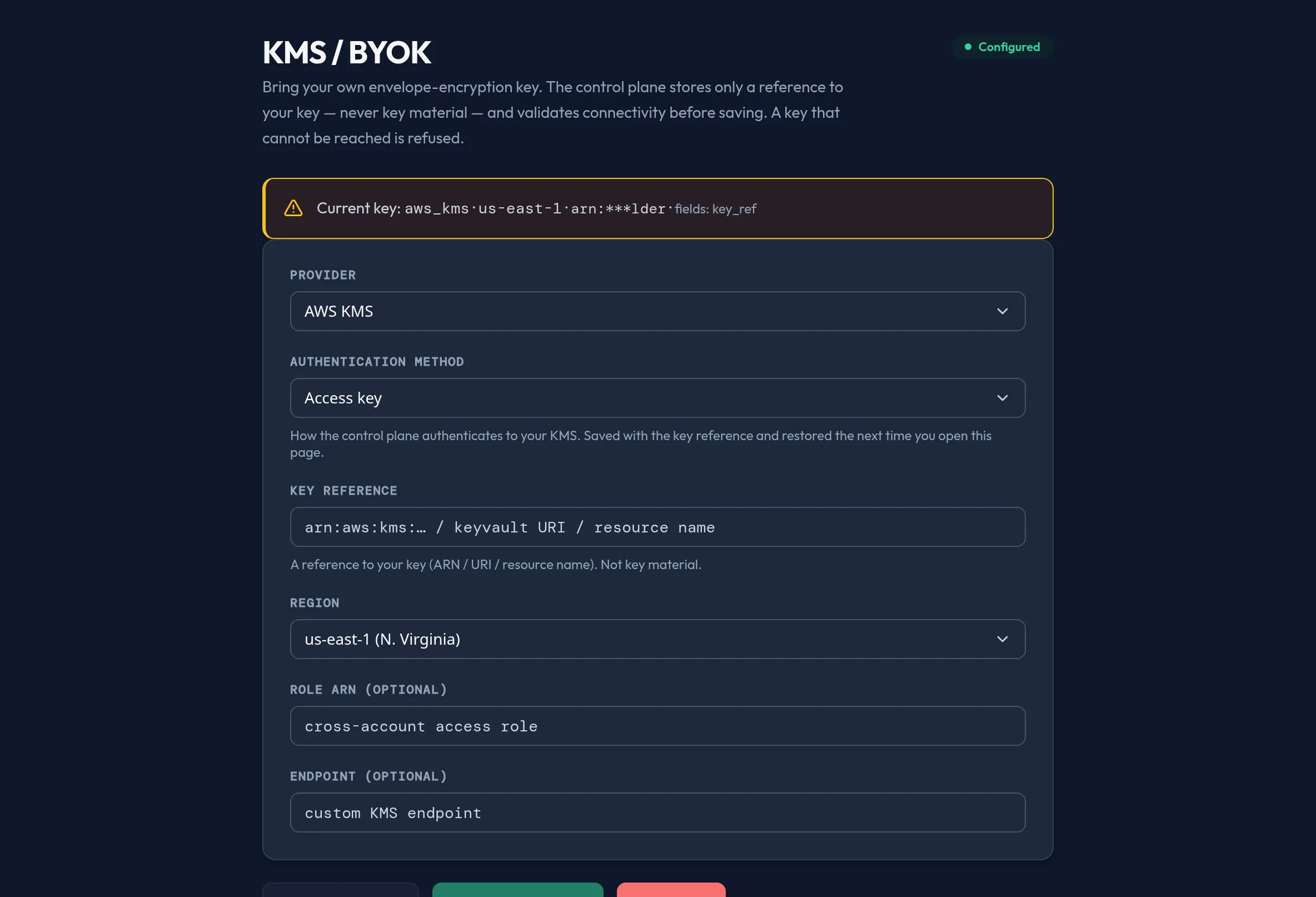
-
Open System → KMS / BYOK. A status badge shows Configured, Not configured, or Unavailable.
-
Choose a Provider: AWS KMS, Azure Key Vault, GCP KMS, or HashiCorp Vault. The Authentication method list updates to that provider’s valid options.
-
Enter the Key reference (an ARN, a Key Vault URI, or a resource name — never key material), and, for AWS/GCP/Azure, pick a Region from the provider’s known region list. Optionally set a Role ARN or a custom Endpoint.
-
Click Test connectivity to validate reachability before saving — nothing is persisted by this check, and no key material is ever echoed back.
-
Click Validate & save key. The save itself is fail-closed: the server validates connectivity again server-side and refuses the key if it can’t be reached.
-
To stop using your key, click Clear key and confirm. This falls back to platform-managed encryption on the next config sync.
API equivalent
Section titled “API equivalent”Read the current (redacted) config, test connectivity without saving, and save a validated key:
curl -X POST "https://admin.arbitex.ai/api/v1/admin/security/kms/get" \  -H "Authorization: Bearer $ADMIN_TOKEN"# → { "summary": { "provider": "aws_kms", "region": "us-east-1", "key_ref_masked": "...1234" }, "revision": 3 }
curl -X POST "https://admin.arbitex.ai/api/v1/admin/security/kms/test" \  -H "Authorization: Bearer $ADMIN_TOKEN" \  -H "Content-Type: application/json" \  -d '{"provider": "aws_kms", "auth_method": "iam_role", "key_ref": "arn:aws:kms:us-east-1:...", "region": "us-east-1"}'
curl -X POST "https://admin.arbitex.ai/api/v1/admin/security/kms/set" \  -H "Authorization: Bearer $ADMIN_TOKEN" \  -H "Content-Type: application/json" \  -d '{"provider": "aws_kms", "auth_method": "iam_role", "key_ref": "arn:aws:kms:us-east-1:...", "region": "us-east-1"}'# → refused (503) unless connectivity is affirmatively validated server-side.
Plan & availability
Section titled “Plan & availability”Bring-your-own-key encryption is typically a higher-tier capability across the industry; check your plan’s entitlements for BYOK availability. Where a plan doesn’t include it, System features above your tier render visible but disabled in the console with an upgrade prompt, consistent with the rest of the Admin Guide.
Deployment notes
Section titled “Deployment notes”On a Hybrid Outpost, the key you author is used by that deployment’s own encryption enforcement points on the next config sync — a key configured on one Outpost is not automatically shared with another. In an air-gapped deployment, your KMS or Vault endpoint must be reachable from within the air gap; a key that requires reaching the public internet cannot be validated from an isolated deployment.
Related
Section titled “Related”- Advanced Settings — general
system_configkeys; credential-domain settings like this one are deliberately kept off that catalog. - Config Backup & Restore — backups are secret-free, so your KMS key reference is never included in a snapshot.