

Global Kill Switch
What it does
Section titled “What it does”The global kill switch is the authoritative emergency-disable control for your organization, and lives as a prominent, confirm-gated section of the Capability Management surface. It engages a global stop that refuses every AI provider call, or scopes a disable to specific providers, models, or platform features — without touching the others. Every change requires an explicit two-step confirmation and is recorded in a change-history audit trail.
Configure in the UI
Section titled “Configure in the UI”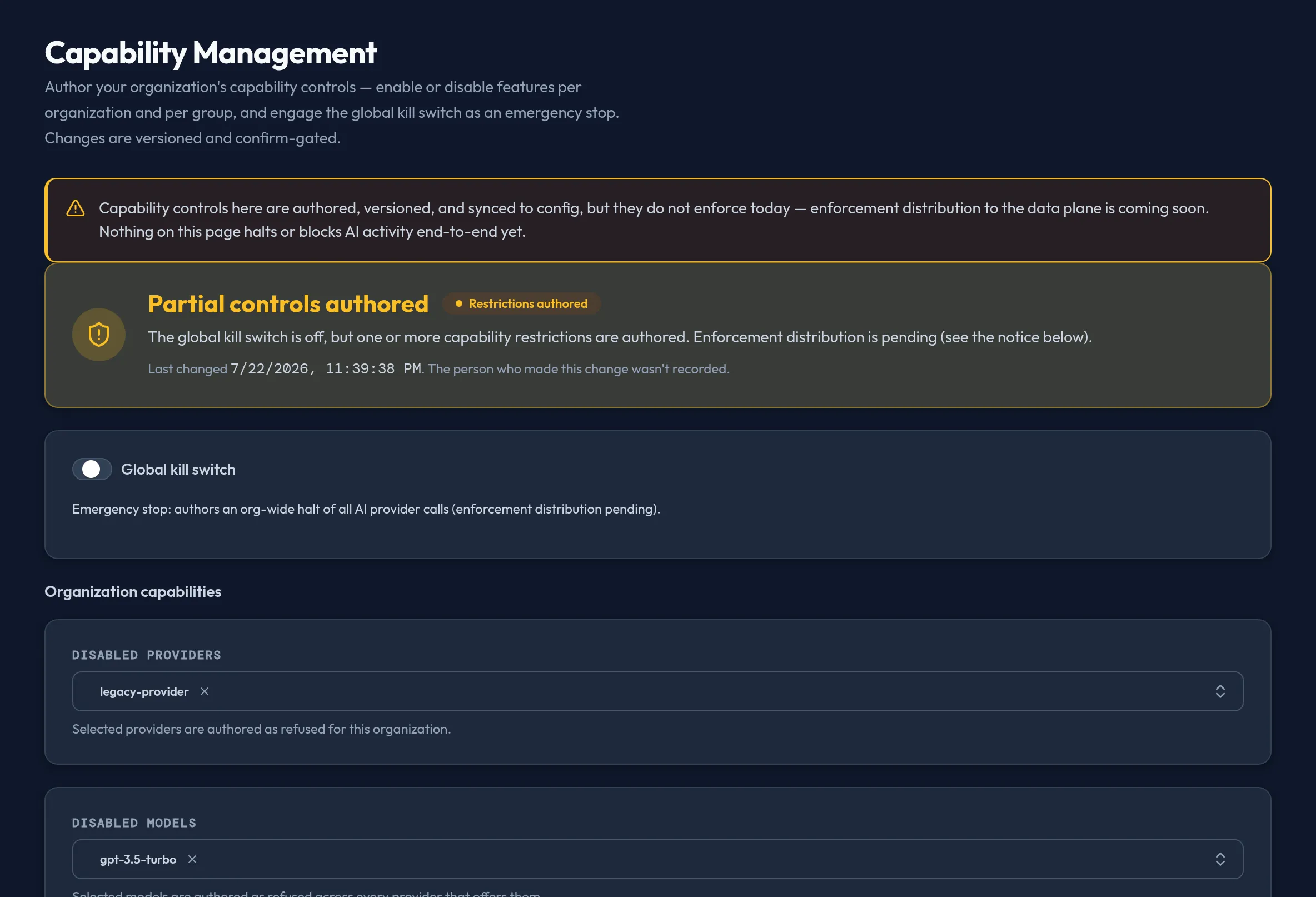
-
Open Security & DLP → Capability Management. The hero card at the top shows the current posture — Normal operation, Restrictions in place (one or more disable lists active), or Emergency stop active (the global switch is engaged) — plus who last changed it and when, when that’s recorded.
-
Toggle Global kill switch to immediately disable all AI provider calls for the organization once saved.
-
To scope a disable instead of a global stop, select entries in Disabled providers, Disabled models, or Killed features — each is a bounded multi-select of known providers, models, and platform capability identifiers (never free-text), so you can’t mistype a value that silently fails to match.
-
Click Save kill switch. A confirmation dialog summarizes exactly what you’re about to apply (global kill on/off, and the count of disabled providers, models, and killed features) — nothing is sent until you confirm.
-
Review Change history below the form — every prior revision with its timestamp, global-kill state, counts, and who authored it (an em-dash where the change predates attribution tracking).
API equivalent
Section titled “API equivalent”curl -X POST "https://admin.arbitex.ai/api/v1/admin/security/kill-switch/get" \ -H "Authorization: Bearer $ADMIN_TOKEN"Save a new kill-switch revision:
curl -X POST "https://admin.arbitex.ai/api/v1/admin/security/kill-switch/set" \ -H "Authorization: Bearer $ADMIN_TOKEN" \ -H "Content-Type: application/json" \ -d '{ "global_kill": false, "disabled_providers": ["openai"], "disabled_models": [], "killed_features": ["dlp.sidecar"] }'Read the change history and who last changed it:
curl -X POST "https://admin.arbitex.ai/api/v1/admin/security/kill-switch/history" \  -H "Authorization: Bearer $ADMIN_TOKEN" \  -H "Content-Type: application/json" \  -d '{"limit": 50}'
curl -X POST "https://admin.arbitex.ai/api/v1/admin/security/kill-switch/attribution" \  -H "Authorization: Bearer $ADMIN_TOKEN"
Plan & availability
Section titled “Plan & availability”The global kill switch and scoped disable lists are available on every plan — an emergency stop is not a feature you should ever find gated.
Deployment notes
Section titled “Deployment notes”A kill-switch revision is versioned and distributed to every enforcement point. On an air-gapped Hybrid Outpost, the new state takes effect once it reaches the data plane through your deployment’s configured update cadence, not necessarily instantly — pair a kill-switch action with your out-of-band incident-response process if you need an immediate stop on an air-gapped deployment. See Outpost software updates.
Related
Section titled “Related”- Email DLP
- Chain — the routing pack decides model/provider selection under normal operation.
- Governance override actions