

Content Filters
What it does
Section titled “What it does”Content Filters is a friendly, grouped view over your detectors — it is not a separate detection engine. Curated Arbitex content categories (foul language, drugs, fraud, illegal activity, and more) and any custom keyword/topic lists you author here both compile to regex detectors, authored and versioned the same way as the Detectors panel.
Configure in the UI
Section titled “Configure in the UI”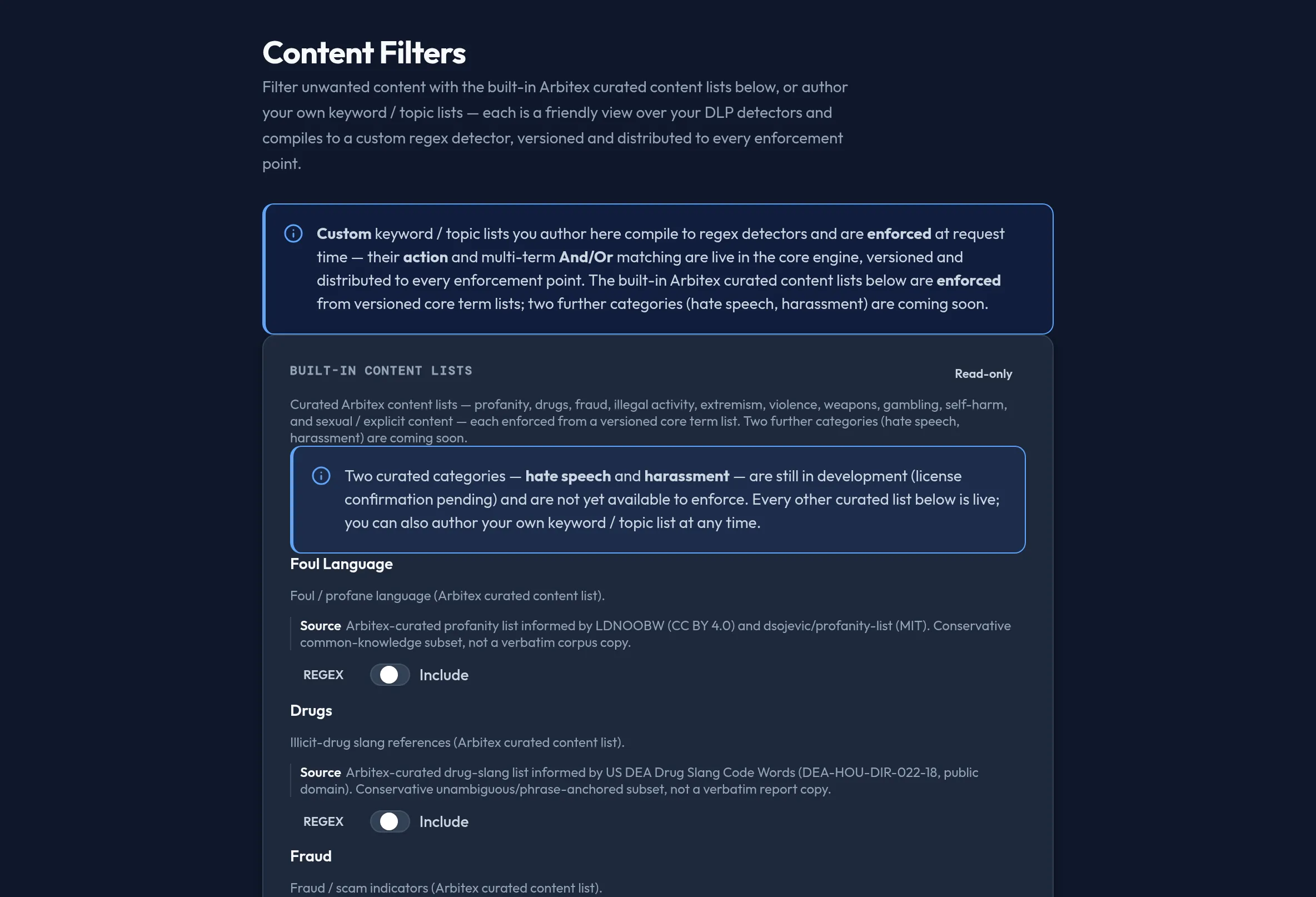
-
Open Security & DLP → Content Filters. The Built-in content lists card shows the curated Arbitex categories — profanity, drugs, fraud, illegal activity, extremism, violence, weapons, gambling, self-harm, and sexual/explicit content.
-
Toggle Include on a category to enforce it, then pick its action (block / redact / log / allow). Two categories — hate speech and harassment — are still in development and render Coming soon, with Include disabled until they ship.
-
Read each category’s framing note where present: self-harm matches are observe-only (flagged for review, never blocked); extremism matches designated terrorist-organization names/aliases, not general topics; gambling ships disabled by default (opt in explicitly).
-
The Native content concerns card lists contextual DeBERTa detectors — jailbreak/prompt-injection, toxicity, and sensitive topics — read-only, the same way as built-in detectors.
-
In Custom content lists, click New content list, give it a name, choose Keyword or Topic, enter the terms, and pick an action. Saving compiles it to a custom regex detector.
-
Toggle a custom list’s enabled switch or Remove it from its row.
-
Scroll to Provider-native content filtration to toggle each configured LLM provider’s own native content-moderation signal — a distinct control from the Arbitex curated lists above, since it consumes the provider’s own safety classifier rather than an Arbitex detector.
API equivalent
Section titled “API equivalent”Content Filters reads and writes through the same detectors control-plane family as Detectors — a per-category Include/action here is stored as a detector, and the built-in category list comes from the shared catalog:
curl -X POST "https://admin.arbitex.ai/api/v1/admin/security/detectors/get" \  -H "Authorization: Bearer $ADMIN_TOKEN"
curl -X POST "https://admin.arbitex.ai/api/v1/admin/security/detectors/catalog" \  -H "Authorization: Bearer $ADMIN_TOKEN"
Saving replaces the whole detector set, so the console always sends built-ins and customs together to avoid clobbering the other surface’s authored detectors:
curl -X POST "https://admin.arbitex.ai/api/v1/admin/security/detectors/set" \ -H "Authorization: Bearer $ADMIN_TOKEN" \ -H "Content-Type: application/json" \ -d '{ "detectors": [ ... ] }'Plan & availability
Section titled “Plan & availability”Custom content lists are part of the core DLP feature set. Which curated Arbitex categories are enabled in your catalog may vary by plan; a category above your tier renders visible but disabled with an upgrade prompt.
Deployment notes
Section titled “Deployment notes”Content filters are versioned and distributed to every enforcement point, including a Hybrid Outpost’s data plane, the same way as detectors and policy packs. If the live core content-category catalog is temporarily unreachable, the built-in lists degrade to an honest “temporarily unavailable” notice — your custom lists remain unaffected.
Related
Section titled “Related”- Detectors — the underlying match-definition catalog.
- Policy Packs — apply a content-filter detector with different filters/actions per pack.
- Content categories reference
- Content detection reference