

Config Backup & Restore
What it does
Section titled “What it does”Config Backup & Restore is the single round-trip for moving authored config in and out of a scope: back up the current config for one scope (snapshot + download), or restore a bundle by uploading it, previewing a structured diff against the current config, and replaying it into a target scope. It is single-scope and secret-free — provider credentials are never exported, and a restore never merges across deployment units. This panel also replaces the former standalone Config Export and Config Import pages, which are now one surface.
Configure in the UI
Section titled “Configure in the UI”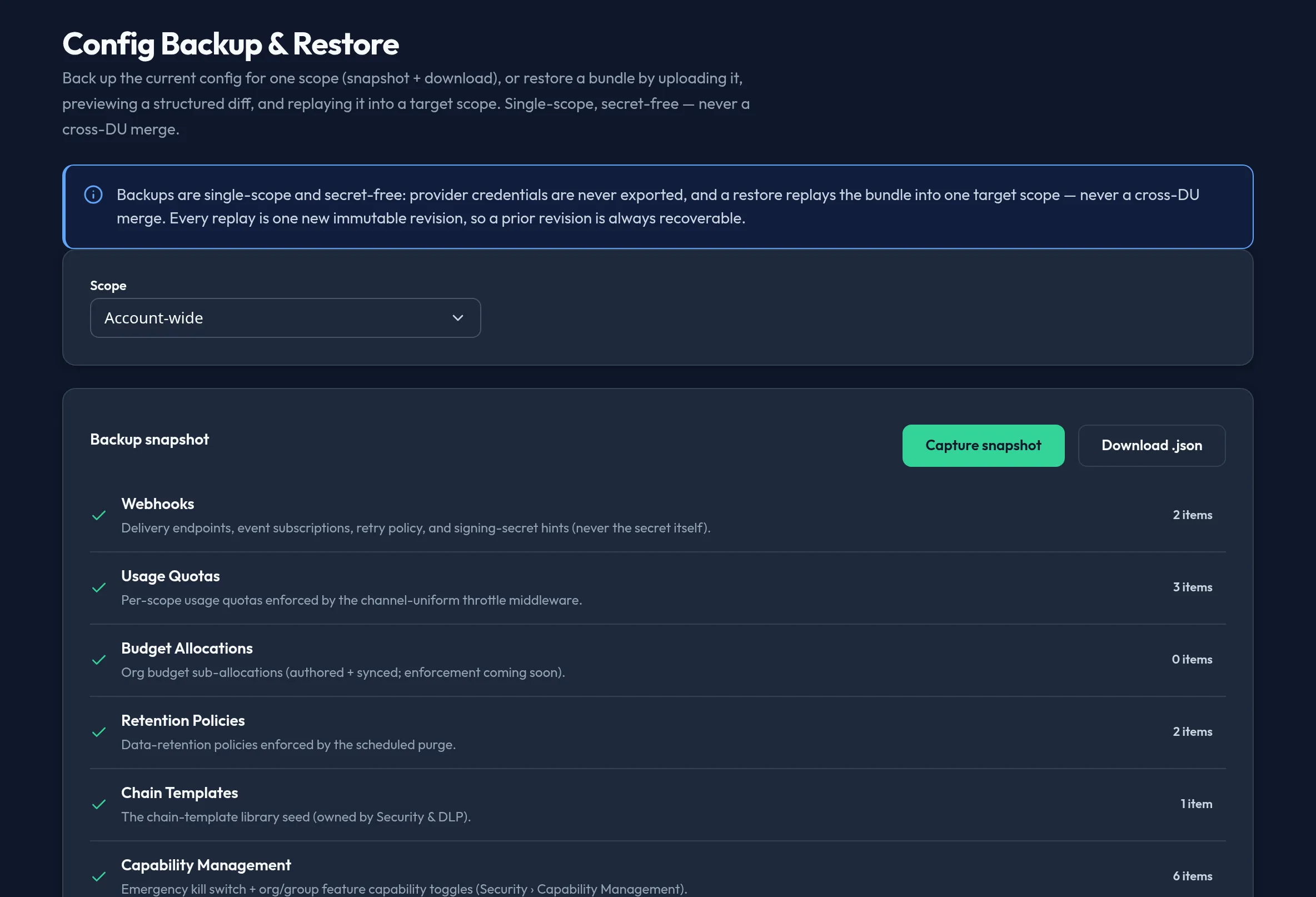
-
Open System → Config Backup & Restore and choose a Scope — Account-wide or a specific deployment unit.
-
The Backup snapshot card auto-loads a preview for that scope: a “what’s included” manifest (webhooks, usage quotas, budget allocations, retention policies, chain templates, group features, model guidance, advanced settings, and any other authored domain) with a live per-domain object count.
-
Click Capture snapshot to refresh the preview, then Download .json to save the bundle locally.
-
To restore, drop a previously exported
.jsonbundle into the Restore from a backup card. The bundle is parsed and validated — a mismatched schema version or any credential field is rejected before anything is replayed. -
Review the structured diff between the uploaded bundle and the current scope, then click Replay bundle and confirm in the dialog.
-
If the replay succeeds, a Rollback available panel lets you Revert to previous configuration — the snapshot captured just before the replay, replayed back as one further revision. If the replay fails, this rollback runs automatically, re-asserting your prior configuration; if the automatic rollback also fails, download the pre-restore snapshot to recover manually.
-
Use Revision history to see every immutable revision the store retains for the scope, and the collapsible Compare backups section to diff any two revisions read-only, without restoring either.
API equivalent
Section titled “API equivalent”Capture a secret-free snapshot for a scope (du_id: null = account-wide):
curl -X POST "https://admin.arbitex.ai/api/v1/admin/system/config-backup/snapshot" \ -H "Authorization: Bearer $ADMIN_TOKEN" \ -H "Content-Type: application/json" \ -d '{"du_id": null}'# → { "objects": [ { "domain": "webhooks", "object_key": "...", "payload": { ... } }, ... ] }Replay a bundle into a target scope as one new revision:
curl -X POST "https://admin.arbitex.ai/api/v1/admin/system/config-backup/restore" \ -H "Authorization: Bearer $ADMIN_TOKEN" \ -H "Content-Type: application/json" \ -d '{"target_du_id": null, "bundle": { "objects": [ ... ] } }'# → { "revision": 12, "object_count": 8, ... }List the immutable revisions retained for a scope:
curl -X POST "https://admin.arbitex.ai/api/v1/admin/store/revisions/list" \ -H "Authorization: Bearer $ADMIN_TOKEN" \ -H "Content-Type: application/json" \ -d '{"du_id": null}'Plan & availability
Section titled “Plan & availability”Config backup and restore is available on every plan. The deployment-unit scope picker only shows units your account actually has — the server validates any target scope against your account regardless of what a client sends.
Deployment notes
Section titled “Deployment notes”On a Hybrid Outpost, a snapshot and restore operate against that deployment’s own control-plane store — a bundle exported from one Outpost is not automatically portable to another unless you intentionally target it as the restore scope. In an air-gapped deployment, the backup/restore flow works entirely offline: both capture and replay are local API calls with no external dependency.
Related
Section titled “Related”- Advanced Settings — the
system_configcatalog is one of the domains a backup captures. - Webhooks, Budget, Group Features — each authors one of the domains this panel backs up and restores.