

Email DLP
What it does
Section titled “What it does”Email DLP authors your organization’s email-channel DLP configuration and the quarantine release/hold queue for held messages. It has four parts: the base scan configuration, extended policy (allowed sender domains, rate limit, attachment-size ceiling), a live read-only view of what’s currently quarantined, and the authored release/hold/delete decision queue.
Configure in the UI
Section titled “Configure in the UI”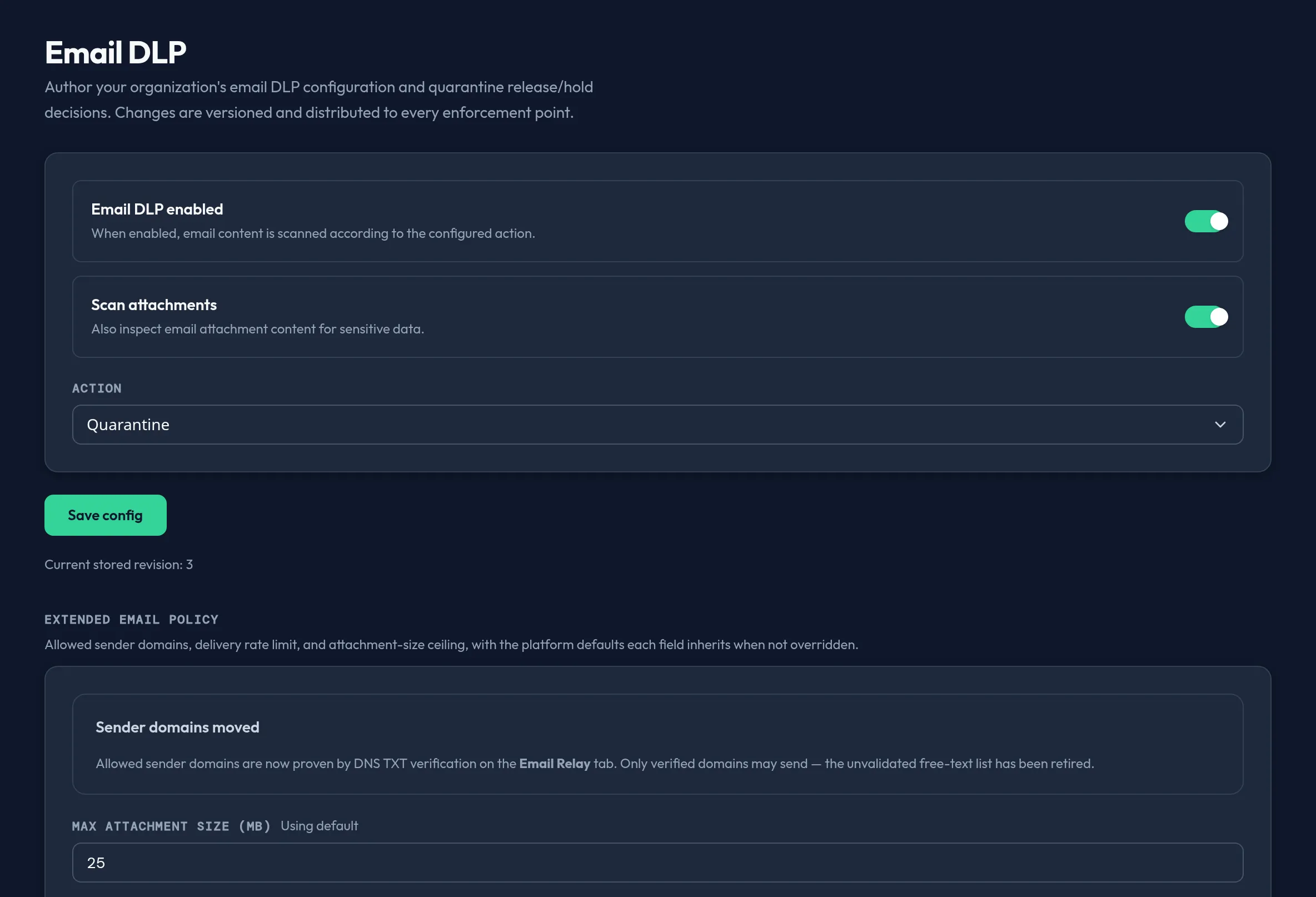
-
Open Security & DLP → Email DLP. Toggle Email DLP enabled and Scan attachments, and choose the Action for a match: Quarantine, Block, or Flag. Click Save config.
-
In Extended email policy, manage Allowed sender domains as chips, and set the Max attachment size (MB) and Rate limit (per minute). Each field shows an Overridden badge when it diverges from the platform default, or “Using default” otherwise. Click Save extended policy. The Platform defaults panel below shows what you’d inherit if you cleared an override, plus any compliance-template provenance.
-
Review Pending quarantine (live) — the real messages currently held in quarantine, read live from the enforcement pipeline. This table is read-only; if the live feed is temporarily unreachable, it shows an honest “temporarily unavailable” notice rather than fabricating rows.
-
In the Quarantine queue below, filter by decision status (All / Release / Hold), then use each row’s Release, Hold, or Delete action. Every action commits immediately as a new revision.
API equivalent
Section titled “API equivalent”Base config:
curl -X POST "https://admin.arbitex.ai/api/v1/admin/security/email/config/get" \  -H "Authorization: Bearer $ADMIN_TOKEN"
curl -X POST "https://admin.arbitex.ai/api/v1/admin/security/email/config/set" \  -H "Authorization: Bearer $ADMIN_TOKEN" \  -H "Content-Type: application/json" \  -d '{"enabled": true, "scan_attachments": true, "action": "quarantine"}'
Extended policy (allowed sender domains, attachment size, rate limit):
curl -X POST "https://admin.arbitex.ai/api/v1/admin/security/email/config/extras/get" \  -H "Authorization: Bearer $ADMIN_TOKEN"
curl -X POST "https://admin.arbitex.ai/api/v1/admin/security/email/config/extras/set" \  -H "Authorization: Bearer $ADMIN_TOKEN" \  -H "Content-Type: application/json" \  -d '{"allowed_sender_domains": ["example.com"], "max_attachment_size_mb": 25, "rate_limit_per_minute": 100}'
Live pending-quarantine feed (read-only):
curl -X POST "https://admin.arbitex.ai/api/v1/admin/security/email/quarantine/pending" \ -H "Authorization: Bearer $ADMIN_TOKEN"Quarantine decision queue:
curl -X POST "https://admin.arbitex.ai/api/v1/admin/security/email/quarantine/get" \  -H "Authorization: Bearer $ADMIN_TOKEN"
curl -X POST "https://admin.arbitex.ai/api/v1/admin/security/email/quarantine/set" \  -H "Authorization: Bearer $ADMIN_TOKEN" \  -H "Content-Type: application/json" \  -d '{"decisions": [{"message_id": "...", "decision": "release", "reason": null}]}'
Plan & availability
Section titled “Plan & availability”Base email DLP configuration is part of the core DLP feature set. Extended policy (allowed sender domains, rate limit, attachment size) and the live pending-quarantine feed are gated by your Outpost/backend version — if either route isn’t available yet in your deployment, the console shows an honest “pending backend” notice while the base config and quarantine queue remain fully usable.
Deployment notes
Section titled “Deployment notes”Email DLP config and quarantine decisions are versioned and distributed to every enforcement point. The live pending-quarantine feed proxies a cross-plane read from the platform; on a Hybrid Outpost, that read depends on the Outpost’s connectivity back to the control plane — an air-gapped deployment may show the feed as temporarily unavailable while the authored config and decision queue continue to work locally.
Related
Section titled “Related”- Email DLP configuration reference
- Email quarantine management reference
- Attachment DLP guide
- Kill Switch — halt all AI activity in an emergency.