

Policy Packs
What it does
Section titled “What it does”Policy Packs is where you compose the contents of your policy packs — the ordered collections of chain entries that the Chain panel orders and combines. A pack is where a detector becomes a chain entry: you pick a detector, then set its filters, action, and order for that specific application. Compliance Bundles are folded into this panel — apply an Arbitex-managed bundle as a read-only, in-sync reference, or clone one into a fully editable custom pack.
Configure in the UI
Section titled “Configure in the UI”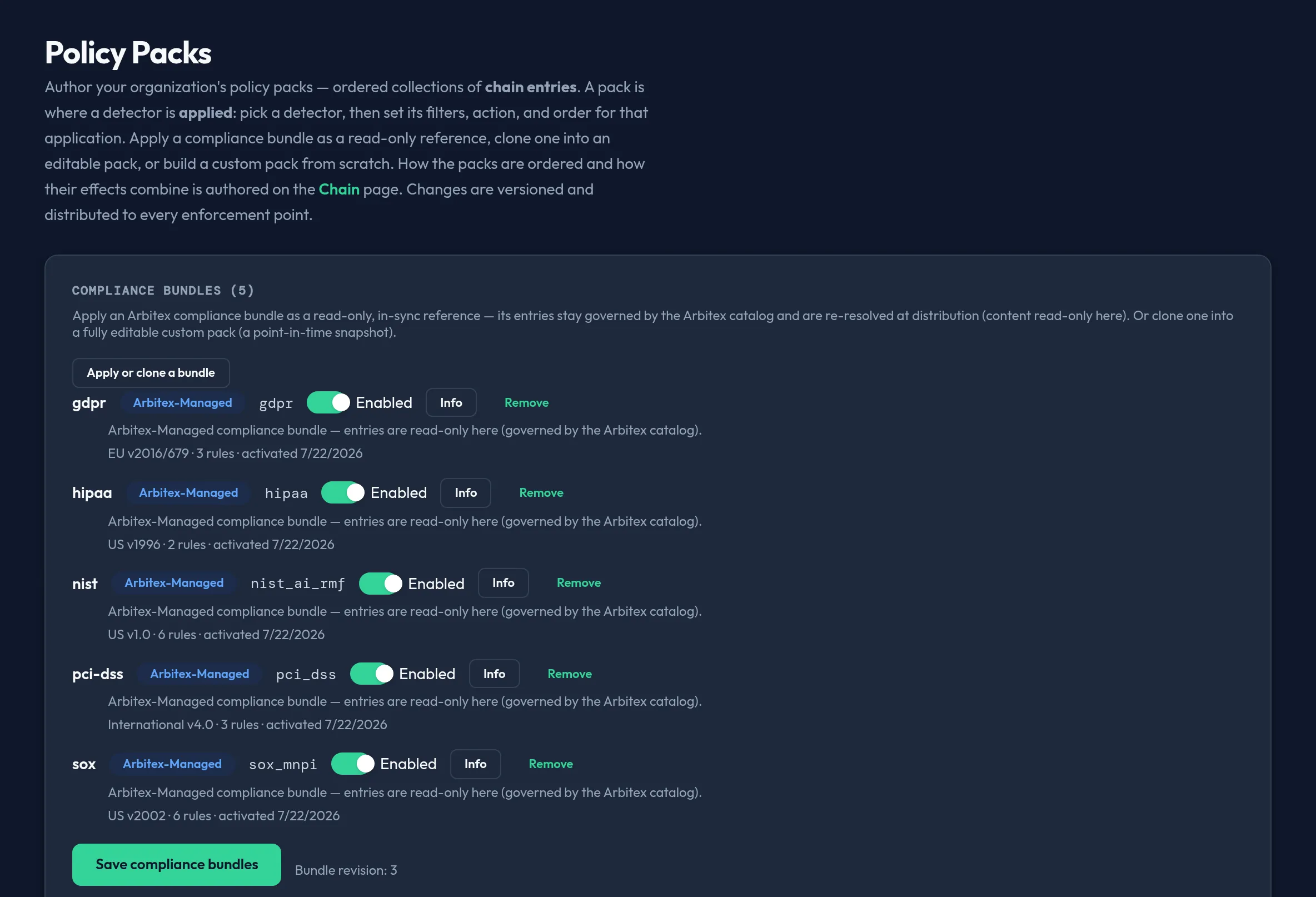
-
Open Security & DLP → Policy Packs. The Compliance bundles section at the top lists any Arbitex compliance bundles already applied.
-
Click Apply or clone a bundle to open the Arbitex compliance catalog. For each bundle you can:
- Apply — add it as a read-only, in-sync reference. Its entries stay governed by the Arbitex catalog and are re-resolved at distribution; you can enable/disable and reorder the pack in the chain, but not edit its entries.
- Clone into pack — copy it into a new, fully editable custom pack (a point-in-time snapshot that does not auto-update with future Arbitex revisions).
-
Toggle a bundle’s Enabled switch and click Save compliance bundles to commit.
-
In the Policy packs section, click New policy pack for an empty custom pack, or Add from library to pull a shared pack. Give it a unique name.
-
Inside a custom or cloned pack, click to add a chain entry: pick a detector from the picker (built-in or your own custom detector), set its action (block / redact / log / allow), and optionally add filters — And/Or conditions over regex, request metadata, or a target (org / group / app / user).
-
Reorder entries with Up / Down, and reorder packs the same way. An Applied (compliance-bundle) pack’s entries render read-only; only Custom and Cloned packs are entry-editable.
-
Click Save policy packs to commit. The button is disabled if any pack has a blank or duplicate name, or a filter clause is missing a pattern or target.
-
Use Test a pack to paste sample content and see which entries in a single selected pack would fire and the resulting action — a client-side approximation: your own custom detectors’ regex is evaluated exactly, while built-in and contextual (engine-owned) detectors read as indeterminate.
API equivalent
Section titled “API equivalent”Policy Packs shares the same control-plane resource as Chain — reading or saving here reads/writes the whole chain (packs + combining mode), so a save never clobbers the chain’s ordering.
curl -X POST "https://admin.arbitex.ai/api/v1/admin/security/policy/get" \ -H "Authorization: Bearer $ADMIN_TOKEN"Clone a compliance bundle from the Arbitex catalog into a new editable pack:
curl -X POST "https://admin.arbitex.ai/api/v1/admin/security/policy/clone-bundle" \ -H "Authorization: Bearer $ADMIN_TOKEN" \ -H "Content-Type: application/json" \ -d '{"template_id": "pci_dss"}'List the shared pack library available to add into the chain:
curl -X POST "https://admin.arbitex.ai/api/v1/admin/security/policy/packs" \ -H "Authorization: Bearer $ADMIN_TOKEN"Save the whole set of packs as a new revision:
curl -X POST "https://admin.arbitex.ai/api/v1/admin/security/policy/set" \ -H "Authorization: Bearer $ADMIN_TOKEN" \ -H "Content-Type: application/json" \ -d '{ "packs": [ ... ], "combining_algorithm": "deny_overrides", "default_cost_routing_strategy": "balanced" }'Plan & availability
Section titled “Plan & availability”Policy pack authoring, including compliance-bundle apply/clone, is part of the core DLP feature set. Which compliance bundles are available in your catalog may vary by plan; a bundle above your tier renders visible but disabled with an upgrade prompt.
Deployment notes
Section titled “Deployment notes”Saved packs are versioned and distributed to every enforcement point, including a Hybrid Outpost’s data plane. On an air-gapped Outpost, the latest revision applies only once it reaches the data plane through your deployment’s configured update mode.
Related
Section titled “Related”- Chain — order these packs and pick the combining mode.
- Detectors — the match definitions you apply here.
- About DLP — the conceptual model.
- Compliance bundles
- Policy engine deep dive
- Policy rule reference