

AI Inventory
What it does
Section titled “What it does”AI Inventory is a consolidated, read-only inventory of the AI that flows through Arbitex — the providers, models, MCP servers, and retrieval sources you’ve configured, joined with usage telemetry. Arbitex is an AI gateway, not an inline network appliance: it reports only what the control plane can actually observe, and it does not claim to discover AI usage that bypasses the gateway.
Configure in the UI
Section titled “Configure in the UI”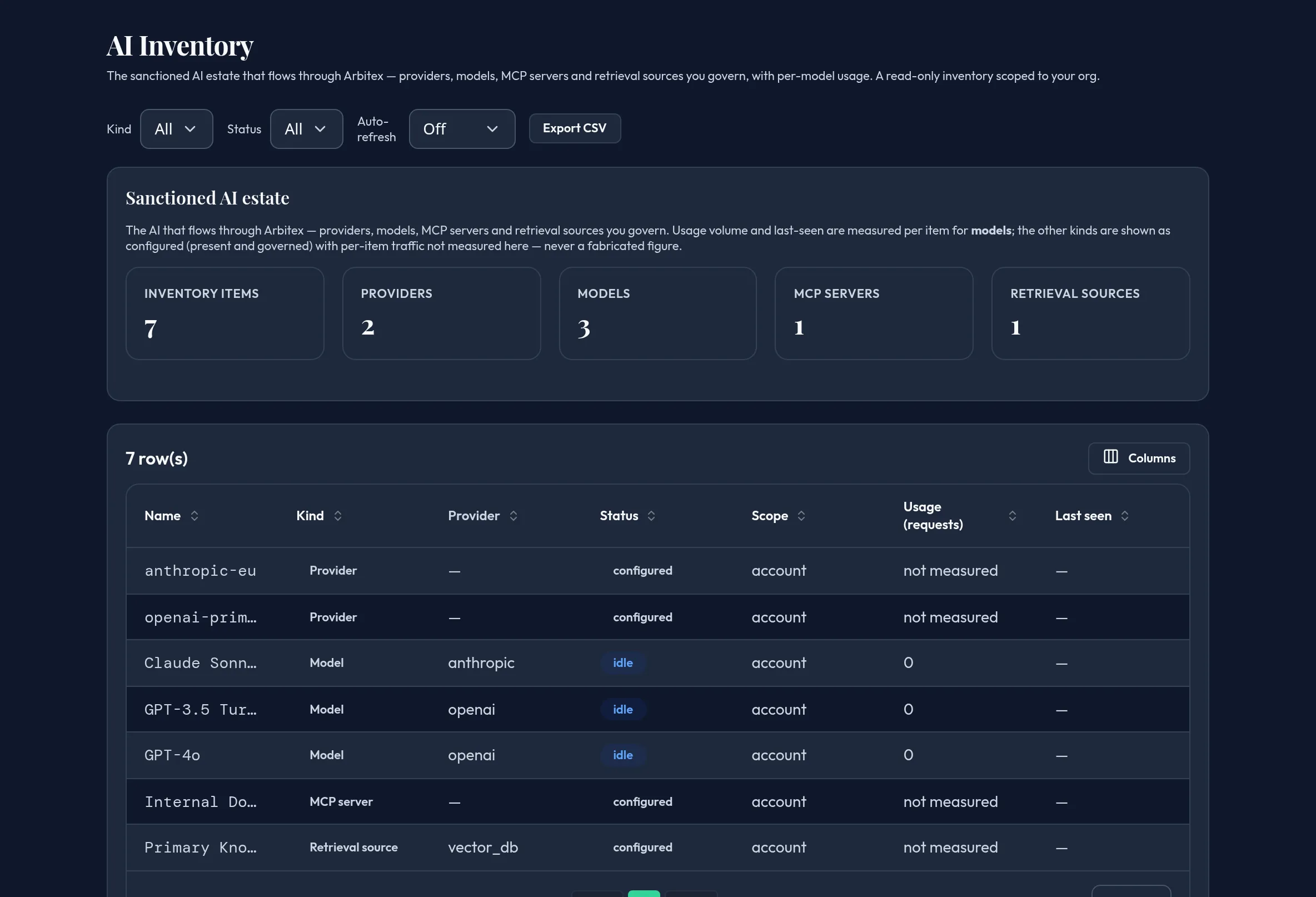
-
Open Monitoring & Reporting → AI Inventory. Review the Sanctioned AI estate summary tiles — total items and a count per kind (providers, models, MCP servers, retrieval sources).
-
Filter the table by Kind or Status (active, idle, configured, unused).
-
Read the Usage (requests) column: models show a real measured count (including a real zero); other kinds show “not measured” — never a fabricated number — because only per-model usage telemetry exists today.
-
Review Last seen, Status, Provider, and Scope for each row; export the table via the shared column-chooser/CSV export.
API equivalent
Section titled “API equivalent”curl -X POST "https://admin.arbitex.ai/api/v1/admin/monitoring/ai-inventory" \ -H "Authorization: Bearer $ADMIN_TOKEN" \ -H "Content-Type: application/json" \ -d '{}'Plan & availability
Section titled “Plan & availability”Available on every plan.
Deployment notes
Section titled “Deployment notes”The inventory composes existing provider/model/MCP/retrieval-source configuration with usage telemetry server-side. In an air-gapped deployment it reflects only what the local control plane has configured and recorded.
Related
Section titled “Related”- Models & Routing — where providers, models, and routing are configured.
- DLP Activity