

Advanced Settings
What it does
Section titled “What it does”Advanced Settings exposes the entire platform system_config catalog as
one flat, typed, revisioned page — grouped into collapsible domains, each key
rendered with the right control for its type (toggle, dropdown, number,
text, or JSON). It replaces what would otherwise be dozens of bespoke
single-purpose settings pages, and it retired the former “Org Overrides”
surface, which this page now fully subsumes.
Configure in the UI
Section titled “Configure in the UI”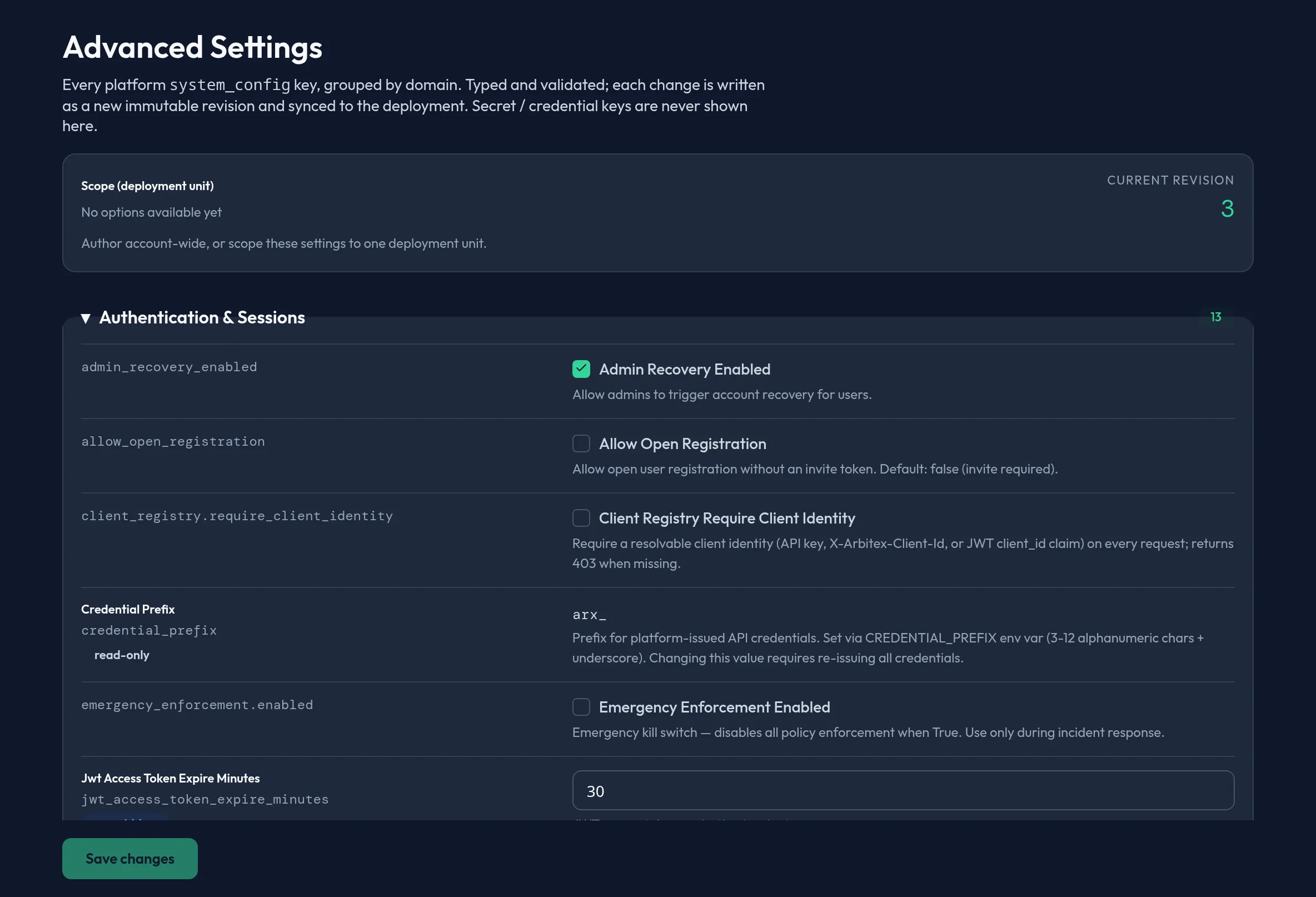
-
Open System → Advanced Settings. Choose a Scope (deployment unit) at the top — leave it blank to author account-wide, or target one deployment unit.
-
Expand a domain group (for example, DLP or Outpost caps) to see its keys. Each key shows its typed control: a switch for booleans, a dropdown for a closed enum, a number input for int/float, plain text for string/URL/ email/cron, or a JSON editor for structured values.
-
Change a value. Keys marked read-only show their current value with no editable control; keys marked overridden differ from the catalog default.
-
Click Save changes — the button shows how many keys changed. Only changed, non-read-only keys are written.
-
If the scope’s config changed elsewhere since you loaded the page, saving surfaces an info banner and reloads the latest values so you can re-apply your edits — your save never silently overwrites a concurrent change.
API equivalent
Section titled “API equivalent”List the catalog (grouped by domain, with the scope’s current revision) and save changed keys, optimistic-locked on that revision:
curl -X POST "https://admin.arbitex.ai/api/v1/admin/system-config/list" \  -H "Authorization: Bearer $ADMIN_TOKEN" \  -H "Content-Type: application/json" \  -d '{"du_id": null}'# → { "revision": 9, "du_id": null, "domains": [ { "domain": "dlp", "label": "DLP", "keys": [ { "key": "...", "value_type": "bool", "current_value": true, "read_only": false, ... } ] } ] }
curl -X POST "https://admin.arbitex.ai/api/v1/admin/system-config/set" \  -H "Authorization: Bearer $ADMIN_TOKEN" \  -H "Content-Type: application/json" \  -d '{"du_id": null, "base_revision": 9, "changes": {"some_config_key": true}}'# → { "revision": 10, ... }  — a 409 means base_revision is stale; reload and retry.
Plan & availability
Section titled “Plan & availability”Advanced Settings is available on every plan. Individual keys may still be gated by your plan’s entitlements even though the catalog itself is visible — a key you can’t change on your tier renders read-only rather than being hidden.
Deployment notes
Section titled “Deployment notes”On a Hybrid Outpost, the catalog and its revision token are scoped to that deployment’s own config store, so a value you author there does not propagate to other deployments unless you intentionally author the same change in each. In an air-gapped deployment, reading and writing the catalog works entirely offline.
Related
Section titled “Related”- Config Backup & Restore — the
system_configcatalog is one of the domains captured in every backup. - KMS / BYOK — where credential-domain encryption config lives, outside this catalog.