

MFA setup & enforcement
What it does
Section titled “What it does”The Auth Policy surface sets your organization-wide multi-factor authentication policy in its MFA enforcement controls. You pick how strictly MFA is required, and Arbitex applies step-up MFA to sensitive actions (such as changing security settings). Individual users enrol an authenticator app or passkey; this surface decides whether that enrolment is optional or mandatory.
Configure in the UI
Section titled “Configure in the UI”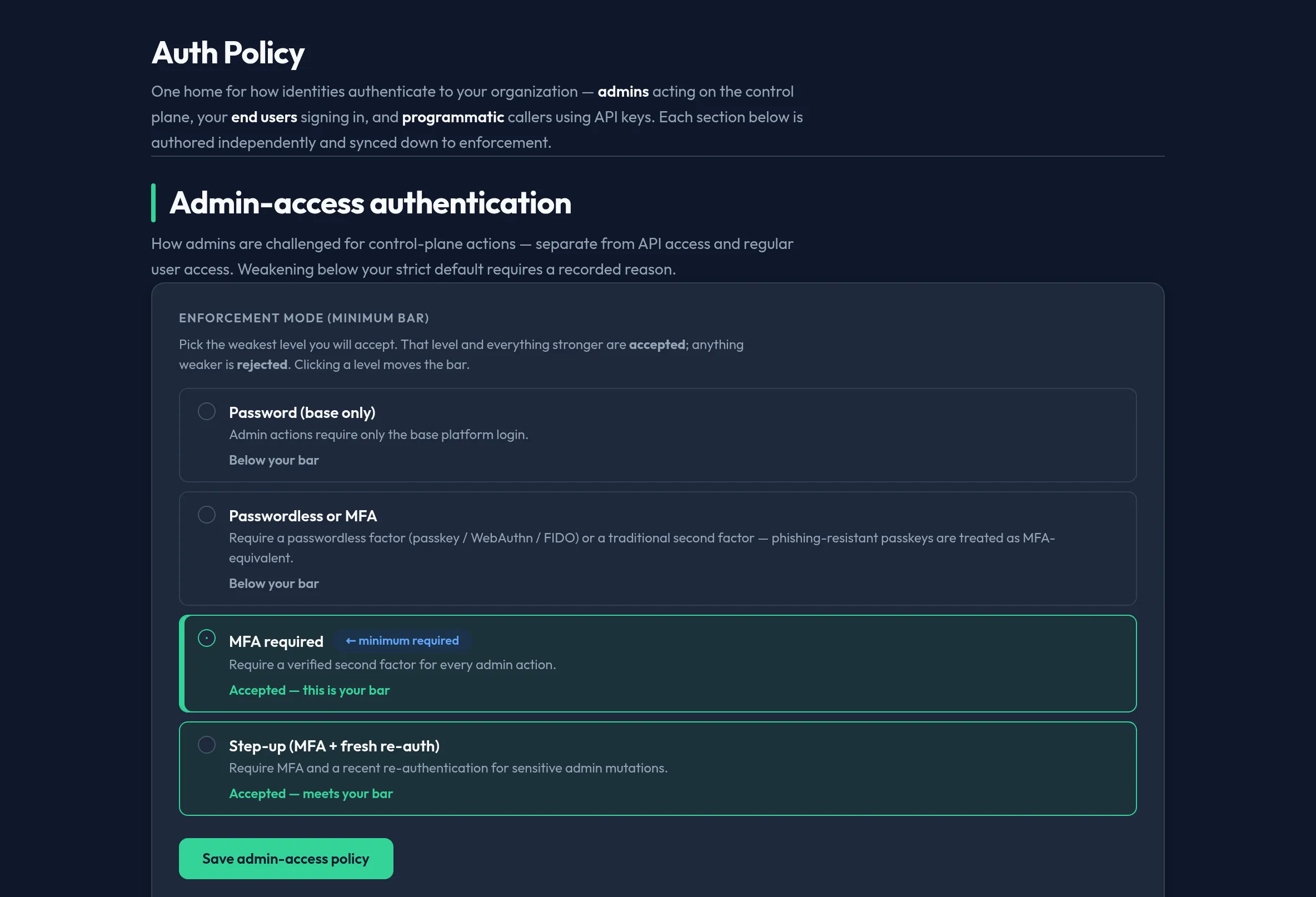
-
Open Users & Access → Auth Policy and go to its MFA enforcement controls.
-
Choose the organization enforcement level:
- Optional — users may enrol MFA but are not required to.
- Required — users must enrol MFA before they can use Arbitex; unenrolled users are prompted at next sign-in.
- Required with step-up — MFA is mandatory and re-prompted for sensitive actions even within an active session.
-
Save. The panel shows current enrolment coverage so you can chase down users who still need to enrol before raising enforcement.
-
Users enrol from their own security settings; admins can see enrolment status but never a user’s secret.
API equivalent
Section titled “API equivalent”The org-wide policy is managed under the org MFA policy API (RPC-style, admin
role):
# read the current policycurl -X POST "https://admin.arbitex.ai/api/v1/admin/org/mfa-policy/list" \  -H "Authorization: Bearer $ADMIN_TOKEN"
# set enforcement to requiredcurl -X POST "https://admin.arbitex.ai/api/v1/admin/org/mfa-policy/update" \  -H "Authorization: Bearer $ADMIN_TOKEN" \  -H "Content-Type: application/json" \  -d '{"enforcement_level": "required"}'
When MFA is required but not satisfied, protected endpoints return 403 with an
X-MFA-Required header so clients can prompt for step-up. Individual enrolment
uses the /api/v1/auth/mfa/* endpoints. See the
MFA enforcement reference for the full
level semantics and endpoint list.
Plan & availability
Section titled “Plan & availability”MFA enforcement is available on every plan. Advanced factors (hardware passkeys, per-group policies) may be gated to higher tiers and render visible-but-disabled with an upgrade prompt.
Deployment notes
Section titled “Deployment notes”MFA is enforced at the control plane. On a Hybrid Outpost, enforcement applies to console and admin-API access. In an air-gapped deployment, prefer authenticator-app (TOTP) or passkey factors that do not depend on outbound delivery.
Related
Section titled “Related”- MFA enforcement reference — levels, step-up, and endpoints.
- Authentication methods
- Account recovery